Reaching out to YouTube creators by hand is slow in a very specific way. You search for a niche, open twenty tabs, check subscriber counts, dig through About pages for an email, watch a bit of a recent video so your message doesn't sound generic, write the email, and then try to remember who to nudge three days later. Do that for a week and you have maybe fifty conversations started and a spreadsheet you no longer trust.
We run creator outreach for our own product, and over a few weeks it grew to well over a thousand small channels contacted. None of that would have been possible manually. This article walks through the pipeline we actually use: how it finds channels, filters them, finds a contact address, personalizes each email, sends and follows up, and tracks replies. The code is Python, the data comes from a public data API, and an AI agent running scheduled routines ties it all together.
You can copy the structure for any product that benefits from working with creators, whether that is a developer tool, a SaaS app, or a course.
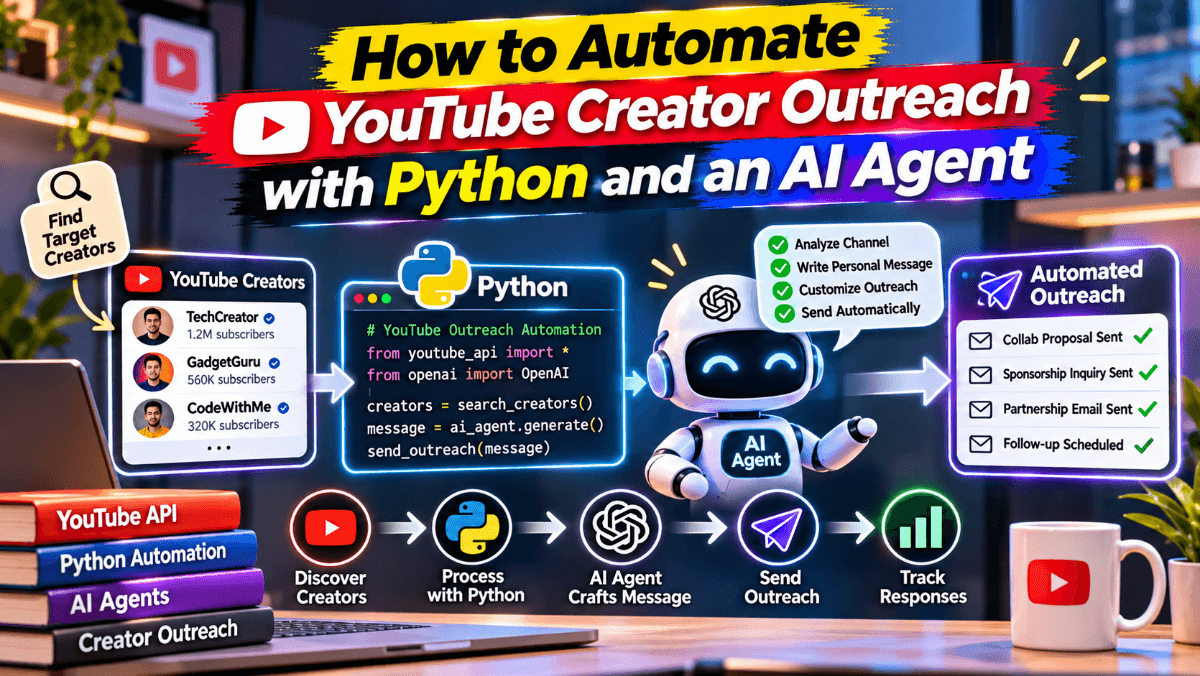
The Pipeline at a Glance
The whole system is six stages that each read and write one shared tracker:
Discover channels by searching recent YouTube videos for niche keywords.
Qualify each channel by subscriber count, topic and a skip list.
Find a contact email from the channel description, About links or the creator's website.
Personalize the email from the channel description and recent uploads.
Send and follow up from one mailbox, with in-thread bumps on day 3 and day 7.
Track replies and bounces so nobody gets a follow-up after they answered.
The tracker is the most important part. It is a plain CSV (we later mirrored it into SQLite and a Google Sheet), and every stage checks it before doing anything. Our columns look like this:
channel_name, channel_url, contact_email, contact_name, fit_note, status,
initial_sent_at, thread_id, message_id, followup_3d_due, followup_7d_due,
followup_3d_sent_at, followup_7d_sent_at, reply_received_at, notes
status is one of sent, replied, closed or bounced. That single field drives all the follow-up logic later.
Step 1: Discover Channels from Recent Videos
Searching for channels directly tends to surface the biggest names in a niche. Searching for videos uploaded this month surfaces people who are actively publishing, which is exactly who you want: a creator who uploaded last week is far more likely to read email than one whose last video is two years old.
We use the YouTube search endpoint of Scrape Atlas, a data API that returns public data from 49 social and marketplace platforms as JSON. It handles the YouTube side (pagination tokens, regional results, parsing), and the free plan gives you 100 credits with no card, which is enough to try everything in this article. Each successful request costs one credit and failed requests cost nothing.
Set your key as an environment variable and write a small helper:
import os
import requests

API = "https://api.scrapeatlas.com/v1/youtube"
HEADERS = {"x-api-key": os.environ["SCRAPEATLAS_API_KEY"]}

def call(endpoint: str, **params) -> dict:
    """GET one endpoint and return the JSON body, or {} on failure."""
    resp = requests.get(f"{API}/{endpoint}", headers=HEADERS,
                        params=params, timeout=90)
    data = resp.json()
    if data.get("status") in ("failed", "challenged"):
        print("request failed:", data.get("failure", {}).get("code"))
        return {}
    return data
Every response carries a status field (success, partial, failed or challenged), so checking it once in the helper keeps the rest of the code clean. A partial result is still usable.
Now search for recent videos and collect the channel handles. The search endpoint pages through results with a continuationToken that you pass back unchanged:
def discover_handles(query: str, pages: int = 4) -> dict[str, str]:
    """Return {handle: channel title} for channels with recent videos."""
    found, token = {}, None
    for _ in range(pages):
        params = {"query": query, "type": "videos", "uploadDate": "this_month"}
        if token:
            params["continuationToken"] = token
        data = call("search", **params)
        for video in data.get("videos") or []:
            ch = video.get("channel") or {}
            if ch.get("handle"):
                found[ch["handle"].lstrip("@")] = ch.get("title", "")
        token = data.get("continuationToken")
        if not token:
            break
    return found
queries = ["python automation tutorial", "build ai agent", "web scraping python"]
candidates = {}
for q in queries:
    candidates.update(discover_handles(q))
Pick queries the way your ideal creator would title a video, not the way you would describe your product. Ten to twenty specific queries per batch work much better than two broad ones.
Step 2: Qualify Channels by Size and Fit
Next, look up each channel. The channel endpoint returns the subscriber count already parsed into an integer, the full description, the About-panel links, and an email field holding the first address found in the public description.
def get_channel(handle: str) -> dict:
    return call("channel", handle="@" + handle.lstrip("@"))
Our most important targeting rule: we only contact channels under 10,000 subscribers. Smaller creators read their own inbox, they are not drowning in brand deals, and a genuinely useful offer stands out. We also set a floor of a few hundred subscribers so we skip brand-new or abandoned channels.
COMPETITOR_TERMS = ["competitor-one", "competitor-two"]  # your own list

def qualifies(channel: dict, min_subs: int = 300, max_subs: int = 10_000) -> bool:
    subs = channel.get("subscriberCount") or 0
    if not (min_subs <= subs < max_subs):
        return False
    blob = (channel.get("description") or "").lower()
    if any(term in blob for term in COMPETITOR_TERMS):
        return False  # skip anyone promoting a competing product
    return True
The skip list matters more than it looks. We skip competitors and anyone who mainly promotes their own competing tool, plus very large companies that will not reply to a cold email anyway. Writing these rules down once, in code, means every batch follows them.
Step 3: Find a Contact Email
Most small creators who want to be contacted put an address somewhere public. We check three places in order:
The email field from the channel response.
Any address in the channel description (some write it as name [at] domain; keep those for manual review).
The creator's own website from the About links, plus its /contact and /about pages.
import re

EMAIL_RE = re.compile(r"[\w.+-]+@[\w-]+(?:\.[\w-]+)+")
SOCIAL = re.compile(r"youtube|youtu\.be|instagram|tiktok|twitter|x\.com|"
                    r"facebook|discord|patreon|linkedin|linktr\.ee|github", re.I)
JUNK = re.compile(r"example|sentry|wixpress|\.png|\.jpg|\.svg|yourname", re.I)

def find_email(channel: dict) -> str | None:
    if channel.get("email"):
        return channel["email"].lower()
    found = EMAIL_RE.findall(channel.get("description") or "")
    # only crawl the website when the description had no address
    sites = [] if found else [l for l in channel.get("links") or []
                              if not SOCIAL.search(l)]
    for site in sites[:2]:
        root = re.match(r"https?://[^/]+", site)
        for url in [site] + ([root[0] + "/contact", root[0] + "/about"] if root else []):
            try:
                html = requests.get(url, timeout=12,
                                    headers={"User-Agent": "Mozilla/5.0"}).text
            except requests.RequestException:
                continue
            found += EMAIL_RE.findall(html[:400_000])
    clean = [e.lower().strip(".") for e in found if not JUNK.search(e)]
    return clean[0] if clean else None
Only use addresses the creator published themselves for contact. If a channel has no public email, skip it. Guessing addresses hurts your sender reputation and is not a great first impression.
Deduplicate before you write anything
Before a candidate goes into the batch, check it against every address, domain and channel URL you have ever contacted. We also compare normalized channel names, because the same person sometimes runs two channels or changes their handle.
import csv

FREE_MAIL = {"gmail.com", "outlook.com", "hotmail.com", "yahoo.com", "proton.me"}

def load_seen(path: str = "outreach-tracker.csv"):
    emails, domains, urls = set(), set(), set()
    with open(path, newline="") as f:
        for row in csv.DictReader(f):
            email = (row.get("contact_email") or "").lower()
            if email:
                emails.add(email)
                domain = email.split("@")[1]
                if domain not in FREE_MAIL:
                    domains.add(domain)
            urls.add((row.get("channel_url") or "").lower().rstrip("/"))
    return emails, domains, urls
A shared company domain counts as already contacted, but a shared Gmail domain obviously does not.
Step 4: Personalize from Recent Videos
A personalized email does not mean a long email. Ours is five short paragraphs, and only one sentence changes per creator: the reason this channel is a fit. To write that sentence well, you need to know what the creator actually makes right now.
The channel-videos endpoint returns the latest 30 uploads with titles, view counts and publish times. Passing includeExtras=true also adds each video's description.
def recent_titles(handle: str, n: int = 5) -> list[str]:
    data = call("channel-videos", handle=handle, sort="latest")
    return [v["title"] for v in (data.get("videos") or [])[:n]]
We give the channel description and the last few titles to an LLM with a narrow instruction: write one plain sentence about who this channel's audience is and why our product would help them. Then we drop that sentence into a fixed template. Keeping the template fixed and generating only the fit line keeps the tone consistent and makes every email easy to review.
TEMPLATE = """Hey {first_name},

I'm Viktor, I cofounded Scrape Atlas. It's an API for public social data
(profiles, posts, videos, comments) so builders don't have to maintain scrapers.

Thought it might be useful since {fit_reason}
I'd love to give you free credits to play with, and we have an affiliate
program if you ever want to share it. Happy to send details if you're interested.

Keen to hear what you think.

Viktor"""
A few copy rules we learned the hard way:
No links in the first email, including the signature. In our experience, links in a cold email push it toward the spam folder. Offer to send details once they reply.
Open with who you are, not with "I just watched your video". That line only works when it bridges naturally into the pitch.
Keep subjects plain and human, like "keen on a partnership". Do not paste a video title into the subject.
Make the offer concrete. Ours is a block of free credits plus a 30% affiliate commission. We never offer paid sponsorships in cold outreach, which keeps the conversation about whether the tool is useful.
Step 5: Send and Schedule Follow-Ups
We send from one dedicated mailbox through the Gmail API, spacing messages about two minutes apart instead of firing a whole batch at once. Every send writes a row to the tracker with the Gmail threadId and both follow-up dates.
from datetime import datetime, timedelta

def log_send(writer, creator: dict, thread_id: str, message_id: str):
    now = datetime.now()
    writer.writerow({
        "channel_name": creator["name"],
        "channel_url": creator["url"],
        "contact_email": creator["email"],
        "fit_note": creator["fit_reason"],
        "status": "sent",
        "initial_sent_at": now.isoformat(timespec="minutes"),
        "thread_id": thread_id,
        "message_id": message_id,
        "followup_3d_due": (now + timedelta(days=3)).date().isoformat(),
        "followup_7d_due": (now + timedelta(days=7)).date().isoformat(),
    })
Follow-ups go out as short replies in the original thread, so the creator sees the context. With the Gmail API, that means sending with the same threadId and setting In-Reply-To and References to the original message's Message-ID header. The day-3 bump is two lines: just bumping this in case it got buried, the offer still stands. The day-7 bump is the last one.
The selection logic is where most of the safety lives:
from datetime import date

def due_followups(rows: list[dict], today: date) -> list[tuple[dict, str]]:
    due = []
    for row in rows:
        if row["status"] != "sent":
            continue  # never bump replied, closed or bounced rows
        for kind in ("3d", "7d"):
            due_on = row.get(f"followup_{kind}_due")
            sent_at = row.get(f"followup_{kind}_sent_at")
            if due_on and not sent_at and date.fromisoformat(due_on) <= today:
                due.append((row, kind))
                break
    return due
Right before each bump, check the whole Gmail thread again, plus a search for any message from that address or domain since the first email, including Spam. The tracker can be a few hours stale, and sending "just bumping this" to someone who replied yesterday is the fastest way to look automated.
Step 6: Track Replies and Bounces
Two inbox scans keep the tracker honest:
Reply scan. Search for inbound messages in every tracked thread. When one arrives, set status to replied, store reply_received_at, clear both follow-up dates, and surface the reply to a human. We also save any rates creators quote, because some reply with a price list instead of a yes or no, and that is useful later.
Bounce scan. Search for delivery failures from the mail system. A permanent failure (address not found, domain does not exist) sets status to bounced and clears the follow-ups. A temporary "delivery delayed" notice does not. We hold those rows and check again on the next run, because the final outcome can go either way.
When a batch has a bounce, we send one prepared backup creator in its place, so each batch still reaches its target count.
Using an AI Agent as the Orchestration Layer
Everything above is ordinary Python. What made it manageable day to day was letting an AI agent run it. We use Grok Bot, an AI assistant that can run shell commands, call APIs and work with a connected Gmail account, and gave it scheduled routines:
On request: "research and send the next 20". The agent runs discovery, qualification and dedupe, writes the fit lines, sends the batch with spacing, logs it, and reports back with totals and any bounces.
Every morning: a follow-up sweep that re-checks each due thread for replies, sends the day-3 and day-7 bumps in-thread, and updates the tracker.
Around midday: a reply scan that logs new replies and bounces, updates statuses, and syncs the tracker to a Google Sheet so the team can see every conversation.
The agent is good at the judgment calls that are tedious to code: is this "Julia" the same person as the "Julia" who declined last week, or a different creator? Is this mailer-daemon message a final failure or a retry notice? Is a reply a real answer or an out-of-office? We write those rules in a plain-text playbook the agent reads on every run, so the rules stay consistent even as the code changes.
Two guardrails we recommend if you try this:
Keep a human on replies. The agent drafts responses, but a person sends them. Negotiations and partnership terms are not something to automate.
Back up the tracker before every write. Our agent copies the CSV before each sweep. Restoring a backup is much easier than reconstructing who was contacted.
Wrapping Up
Automating creator outreach is less about clever code and more about a reliable loop: find active channels, keep the ones that fit, use only published contact details, write one honest sentence about why they fit, and never follow up on someone who already answered. A public data API covers the YouTube data, a CSV tracker holds the state, and an AI agent on a schedule handles the repetitive parts every day.
Start small. Pick ten search queries, run the discovery and qualification steps, and read the shortlist yourself before sending anything. Once the list looks right, the rest of the pipeline is just keeping it running.
Viktor is the Co-Founder of Scrape Atlas, a data API for public social and marketplace data used by developers, researchers and AI agents.