Email migration is not complete simply because messages have been copied from one platform to another. The final transition, commonly called the migration cutover, is equally important. During this stage, users begin working with the destination email environment, incoming messages must reach the correct mailboxes, and administrators need to confirm that transferred information is accessible.
A poorly planned cutover can interrupt communication, create inconsistent mailbox data, or leave users unsure about which platform they should access. These problems become more difficult when an organization moves hundreds of accounts, uses multiple email services, or operates across different departments and time zones.
A structured cutover plan helps IT teams coordinate the transfer, reduce service disruption, and verify that the destination environment is ready for everyday use. This guide explains the technical considerations involved in preparing and executing an email migration cutover.
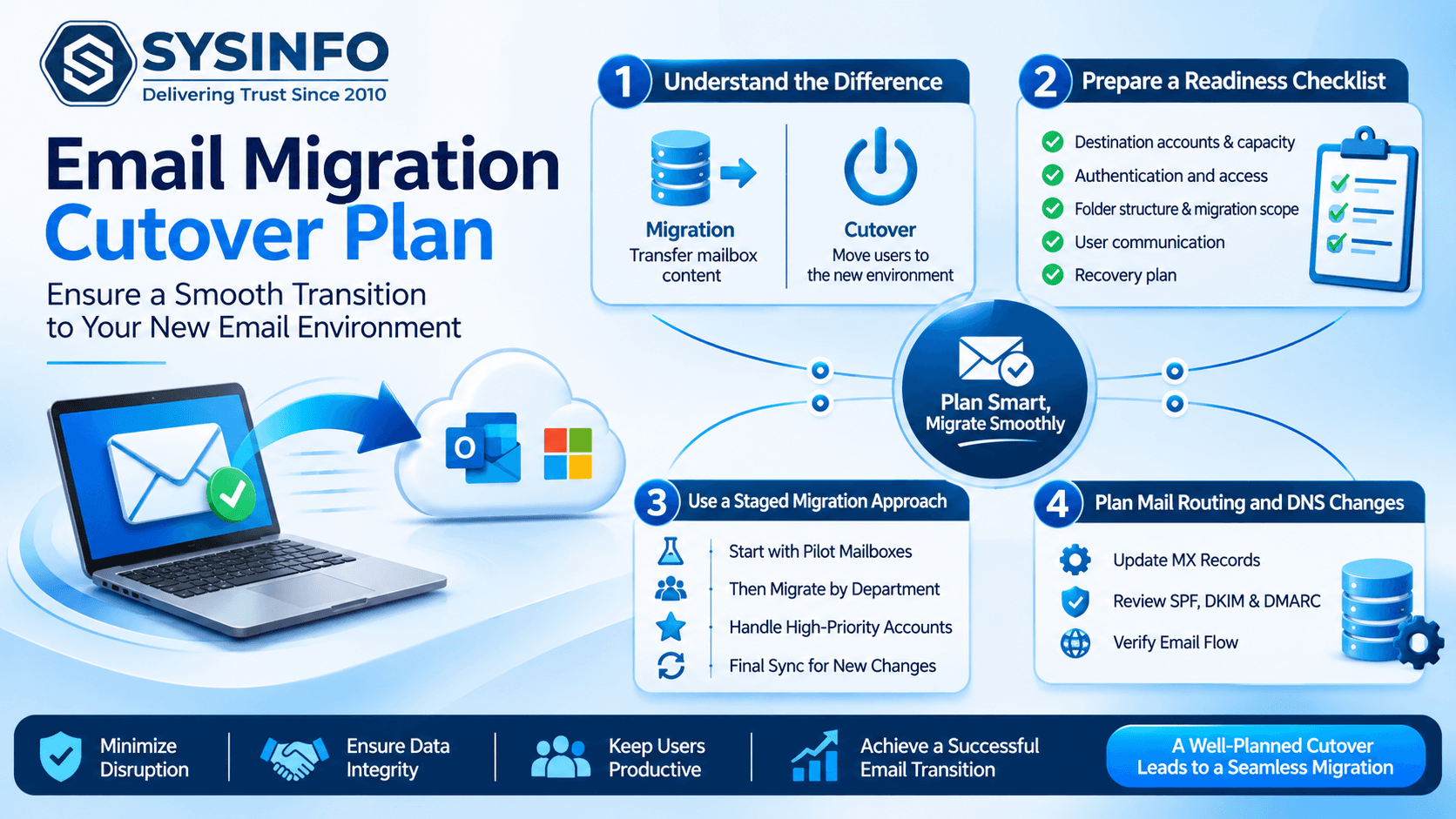
1. Understand the Difference Between Migration and Cutover
Migration and cutover are related, but they represent different stages of an email transition.
Migration involves transferring mailbox content from a source environment to a destination. This can include emails, folders, attachments, and other supported mailbox items.
Cutover is the operational transition in which users and business systems begin relying on the destination environment. It may involve updating mail routing, changing client configurations, confirming account access, and communicating the transition to employees.
For example, an organization moving from an IMAP-based hosting provider to Microsoft 365 might transfer historical mailbox data before changing its mail delivery configuration. The transfer prepares the destination, while the cutover moves daily communication to the new environment.
Separating these stages gives administrators more control over testing and reduces the pressure to complete every activity simultaneously.
2. Prepare a Cutover Readiness Checklist
Before scheduling the transition, administrators should confirm that the destination environment is technically and operationally ready.
A readiness checklist should cover the following areas:
Destination accounts: Confirm that required user mailboxes have been created and are accessible.
Mailbox capacity: Review storage availability and identify accounts with unusually large data volumes.
Authentication: Test the required login methods, permissions, and administrative access.
Folder structure: Check whether destination mailboxes can accommodate the source folder hierarchy.
Migration scope: Confirm which mailboxes, date ranges, and item types must be transferred.
User access: Verify that employees can sign in using the intended destination credentials.
Communication: Inform users about the expected transition window and any temporary restrictions.
Recovery preparation: Retain an appropriate source-data copy and document the steps for addressing unexpected issues.
This checklist should be reviewed by the migration team before the cutover date is approved.
3. Divide the Migration into Controlled Stages
Moving every mailbox in one operation may create unnecessary pressure on administrators, especially when the organization has different departments, mailbox sizes, and usage patterns.
A staged migration allows IT teams to transfer data in manageable groups.
A practical sequence can include:
Stage 1: Pilot Mailboxes
Begin with a small group of users representing different mailbox sizes and usage patterns. Include accounts with large attachments, multiple folders, and important business correspondence.
The pilot helps identify authentication problems, destination restrictions, folder inconsistencies, and transfer-performance issues before the larger migration begins.
Stage 2: Department-Based Migration
After the pilot is reviewed, organize the remaining mailboxes by department or business function. For example, finance, human resources, customer support, and operations can be handled in separate batches.
This approach makes it easier to coordinate user communication and troubleshoot issues within a defined group.
Stage 3: High-Priority Mailboxes
Some accounts require additional attention because they support customer communication, management activities, or critical business processes.
Schedule these mailboxes according to their operational importance. Confirm that their destination accounts, access permissions, and migration scope have been reviewed before transfer.
Stage 4: Final Mailbox Synchronization
Users may continue sending and receiving messages while the initial migration is underway. Therefore, administrators should identify whether new or modified items need another transfer pass.
Where supported, incremental migration or skip-previously-migrated options can help process newly added data without unnecessarily transferring the entire mailbox again.
4. Plan Mail Routing and DNS Changes Separately
Mail routing is one of the most important parts of a cutover, but it should not be confused with mailbox data transfer.
When an organization changes its email provider, administrators may need to update DNS records such as MX records. Other configuration records, including SPF, DKIM, and DMARC, may also require review depending on the destination environment and existing email security setup.
These records serve different purposes:
MX records: Identify the mail servers responsible for receiving messages for a domain.
SPF: Specifies which sending systems are authorized to send email for the domain.
DKIM: Uses cryptographic signatures to help recipients verify message authenticity.
DMARC: Defines how receiving systems should handle messages that fail authentication checks and provides reporting options.
Before changing mail routing, verify the destination mail service's required DNS values. Do not copy records from another domain or assume that the source provider's configuration will work unchanged.
DNS changes may take time to become visible across different networks because of caching and TTL settings. Administrators should account for this behavior when choosing the cutover window.
Most importantly, changing DNS records does not transfer historical messages. Mailbox migration and mail-routing configuration must be planned as separate activities.
5. Choose a Cutover Window Based on Business Activity
The timing of a migration can influence how much disruption users experience.
A suitable window depends on the organization's operating hours, geographic distribution, email volume, and business-critical communication requirements.
Consider these factors when selecting the transition period:
Business operating hours: Avoid beginning a major transition during peak customer-support or transaction-processing periods.
Time zones: Organizations with international teams should identify periods when the fewest users are actively working.
Mailbox activity: Accounts receiving large volumes of messages may require additional synchronization and verification time.
External dependencies: Check applications that send notifications, invoices, password resets, or automated reports through the organization's email domain.
Support availability: Ensure that IT administrators are available throughout the transition and during the initial period after users begin working with the destination.
A cutover window should include time for verification and troubleshooting, rather than being limited to the expected transfer duration.
6. Manage New Emails During the Transition
One common cutover challenge is handling messages that arrive while the migration is taking place.
For example, an administrator may transfer a mailbox in the morning, but the employee continues using the original account throughout the day. New messages may arrive after the initial transfer has finished.
If the team does not account for this activity, the destination mailbox may not contain the latest communication.
A controlled approach includes:
Record the date and time of the initial migration.
Identify whether users can continue accessing the source mailbox during the transition.
Define when users should begin using the destination account.
Perform an additional synchronization pass where supported.
Check recent messages in both environments.
Confirm that no required communication remains only in the source mailbox.
Incremental migration can help transfer newly added items after an initial migration. However, administrators should still review the migration results and verify the final mailbox contents.
7. Check Email Clients and Connected Applications
A successful server-side migration does not automatically guarantee that every employee's email application is ready.
Desktop clients, mobile devices, scanners, CRM platforms, and automated business applications may still use the previous server configuration or authentication details.
After cutover, review the following:
Desktop email client account settings.
Mobile device account configuration.
Incoming and outgoing server details where applicable.
OAuth or other required authentication methods.
Shared mailbox access.
Email signatures and account preferences.
SMTP settings used by websites and business applications.
Automated notifications and scheduled email processes.
Users should be asked to send and receive test messages from their destination accounts. Administrators should also test important external integrations rather than relying only on successful mailbox sign-in.
8. Use Migration Reports to Identify Incomplete Transfers
Migration reports provide useful evidence about the status of individual accounts and transferred items.
A completion message alone does not establish that every mailbox folder was processed correctly. Administrators should examine the report for completed, skipped, and failed items.
A useful verification process includes:
Verification AreaWhat to CheckMailbox statusConfirm that each planned account was processedFolder structureCompare source and destination foldersEmail countsReview message totals in important foldersAttachmentsOpen sample messages containing attachmentsDate coverageCheck older and recently received messagesDuplicate handlingReview whether repeated items were skipped or removed as intendedError recordsIdentify failed items and determine whether another attempt is requiredUser accessConfirm that employees can use the destination mailbox
For large migrations, administrators should maintain a separate exception list. This list can identify accounts that require additional authentication, manual review, or another migration attempt.
9. Establish a Rollback and Contingency Plan
Even a carefully planned migration can encounter unexpected problems. A destination service may become unavailable, users may experience authentication failures, or important messages may not appear as expected.
A contingency plan helps the IT team respond without making rushed configuration changes.
Before cutover, document:
The original mail-routing configuration.
Source mailbox access requirements.
The status of the initial migration.
The location of retained mailbox exports or backup copies.
The procedure for restoring the previous mail-routing configuration, if appropriate.
The team responsible for approving and executing corrective actions.
Rollback should not be treated as an automatic response to every migration issue. Administrators should first determine whether the problem affects a single mailbox, a group of users, or the entire destination environment.
Also, changing mail routing back to the source does not reverse data already transferred. Any rollback decision should account for messages received in both environments during the transition.
10. Document the Final Migration State
Once the cutover is complete, maintain a record of what happened during the migration.
The final documentation should include the list of processed mailboxes, migration timestamps, destination details, skipped items, unresolved errors, and verification results.
This information helps administrators understand the final state of the environment and provides a reference for future troubleshooting.
It is also useful to collect user feedback during the first few days after migration. Employees may identify missing folders, access problems, or application settings that were not detected during technical testing.
A short post-migration review can turn these observations into improvements for future migration projects.
11. Simplify the Transfer Process with Email Migration Software
Managing multiple email sources, destination platforms, and mailbox formats manually can increase administrative effort. A migration utility can help centralize supported transfer operations and provide visibility into the process.
The SysInfo Email Migration Tool supports migration from sources such as PST/OST, IMAP/POP3, Microsoft 365, GoDaddy Office-based accounts, and Hotmail/Outlook. Depending on the selected source and destination, administrators can use available authentication methods, including OAuth 2.0 and other supported account authorization options.
The software also provides options for batch IMAP/POP3 account processing through CSV import, date-based filtering, duplicate removal, attachment handling, and incremental migration. Its Active Tasks dashboard and All Reports section help users monitor migration activity and review transferred, skipped, or failed items.
For organizations preparing a cutover, these capabilities can support the mailbox-transfer and verification stages. DNS changes, user communication, destination readiness, and application configuration should still be managed as separate parts of the overall migration plan.
Conclusion
A successful email migration cutover requires more than transferring mailbox data. It involves preparing destination accounts, organizing migration batches, coordinating mail routing, managing newly received messages, checking connected applications, and validating the final results.
By separating data transfer from the operational transition, IT teams can identify problems earlier and reduce unnecessary disruption. A pilot migration, a clearly defined cutover window, incremental synchronization where supported, and detailed completion reports provide a more controlled approach.
The most reliable migration is one in which users can access their destination mailboxes, important communication remains available, and administrators have clear evidence that the transition has been completed.